Dashboard
Navigation: Sidebar → Dashboard
The BillingOne Dashboard gives you an instant financial snapshot of your MSP. See Monthly Recurring Revenue, active subscriptions, pending invoices, and licensing compliance — all in one view.
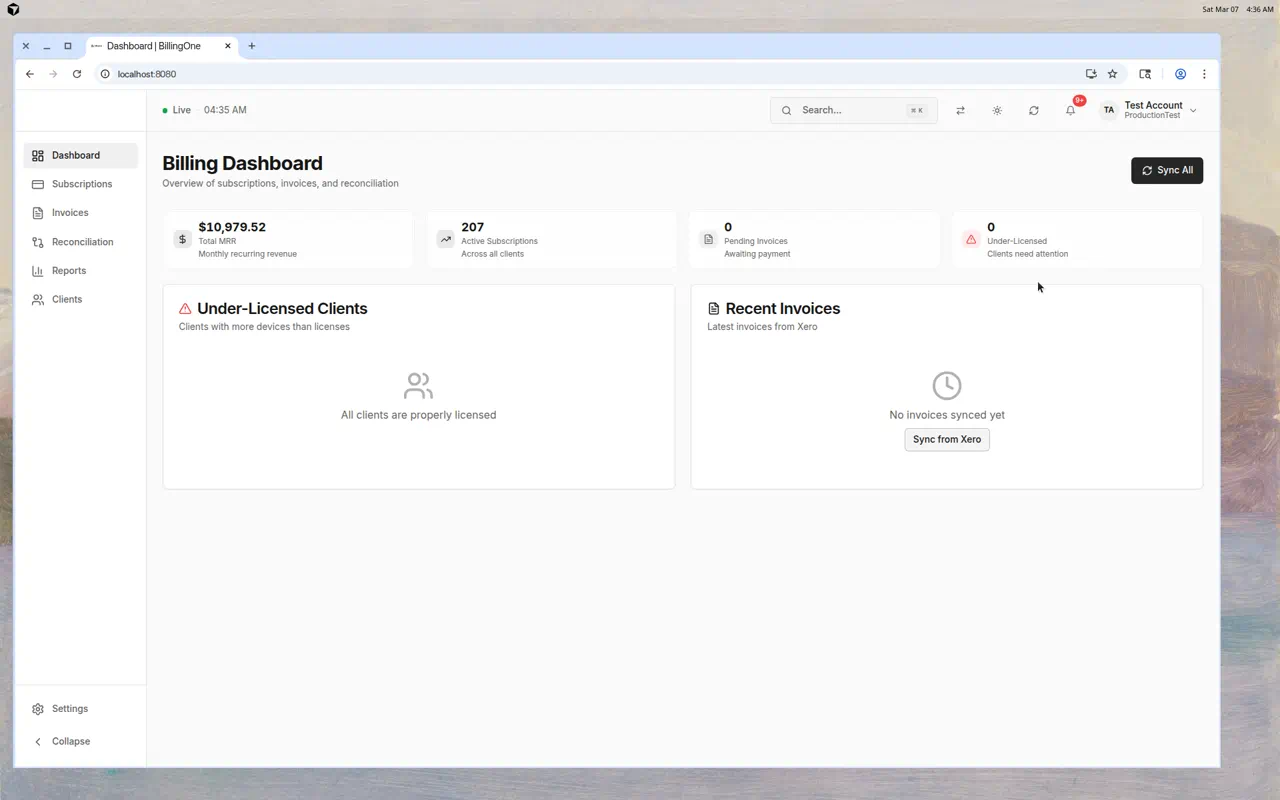
Key Metrics
Four summary cards at the top show your most important numbers:
| Metric | What It Shows |
|---|---|
| Total MRR | Monthly Recurring Revenue — the total monthly value of all active subscriptions |
| Active Subscriptions | Number of currently active Pax8 subscriptions across all clients |
| Pending Invoices | Invoices in draft or submitted status awaiting payment |
| Under-Licensed | Number of clients using more devices than they have licenses for |
Under-Licensed Clients
This section highlights clients whose actual device counts exceed their licensed quantities. These represent potential lost revenue.
- If all clients are properly licensed, you'll see: "All clients are properly licensed"
- If there are discrepancies, each under-licensed client is listed with the variance
Tip: Click through to Reconciliation for a detailed comparison.
Recent Invoices
Shows the latest invoices synced from Xero:
- Invoice number and client name
- Amount and status
- Quick access to review details
If no invoices have been synced yet, you'll see a "Sync from Xero" button.
Sync All
Click the Sync All button in the top-right to trigger a full sync of both Pax8 subscriptions and Xero invoices simultaneously.
Tips
- Check the Dashboard daily — It's the fastest way to spot billing issues
- Watch MRR trends — A declining MRR needs investigation
- Address under-licensed clients — They represent revenue you're not collecting
- Keep invoices synced — Run regular Xero syncs to stay current