Settings
Navigation: Sidebar → Settings
BillingOne Settings let you configure your billing integrations, manage your profile, and adjust organization settings. The settings sidebar includes all the options relevant to billing operations.
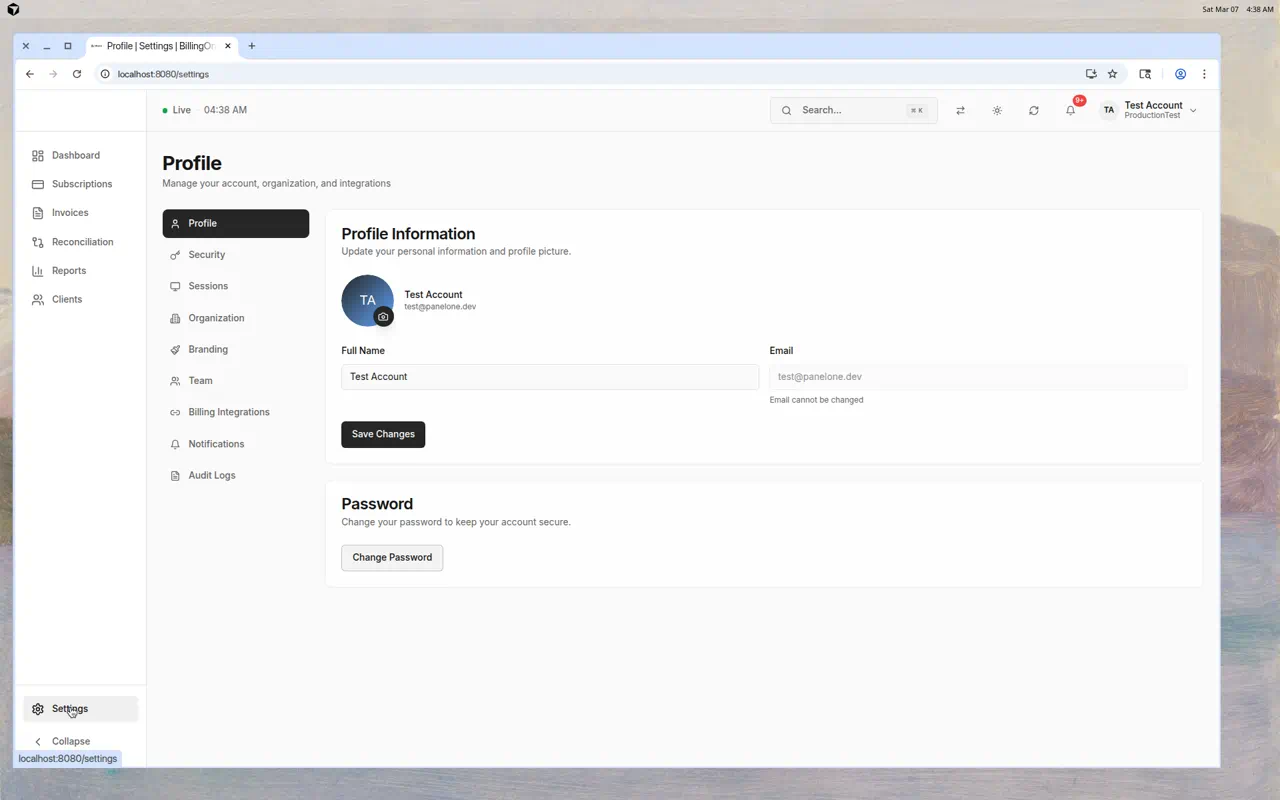
Settings Sections
Profile
Update your personal information:
- Full Name — Your display name
- Email — View your account email (cannot be changed here)
- Profile Picture — Upload or change your avatar
- Password — Click "Change Password" to update
Security
Configure security for your account:
- Multi-Factor Authentication (MFA) — Enable TOTP-based MFA
- Passkeys — Register security keys for passwordless login
- Recovery Codes — View or regenerate MFA recovery codes
Sessions
View and manage active sessions:
- See which devices are signed in
- Terminate sessions you don't recognize
Organization
Manage organization-level settings:
- Organization name and URL slug
- MFA requirements for the team
Branding
Customize BillingOne's appearance:
- Upload your MSP logo
- Set custom colors
Team
Manage team members:
- Invite new members
- Assign roles (Owner, Admin, Engineer, Viewer, Finance)
- Remove team members
Tip: Use the Finance role for team members who only need BillingOne access.
Billing Integrations
This is the most important settings section for BillingOne — it's where you connect your billing tools.
Pax8
Connect your Pax8 account to sync subscriptions:
- Click Configure next to Pax8
- Enter your Client ID and Client Secret (from the Pax8 partner portal)
- Click Test Connection to verify
- Click Save
Once connected:
- Subscriptions sync automatically
- You can trigger manual syncs from the Subscriptions page
- Client-to-company mapping becomes available
Xero
Connect your Xero account to sync invoices:
- Click Configure next to Xero
- Complete the OAuth authorization flow (you'll be redirected to Xero to grant access)
- Once authorized, invoices sync automatically
Once connected:
- Invoices appear on the Invoices page
- The Dashboard shows recent invoice activity
Notifications
Configure what notifications you receive:
- Email notifications for billing events
- In-app notification preferences
Audit Logs
View a log of all actions taken in BillingOne:
- Who made changes and when
- Configuration updates
- Sync history
Tips
- Connect Pax8 first — It powers the Subscriptions, Reconciliation, and Dashboard pages
- Connect Xero second — It feeds the Invoices page and dashboard invoice section
- Test connections after configuring — Catch credential issues before they cause problems
- Use the Finance role — Give billing team members access to BillingOne without exposing the full PanelOne operational dashboard
- Review audit logs — Track who made billing changes and when