Profile
The Profile page lets you manage your personal information and account settings.
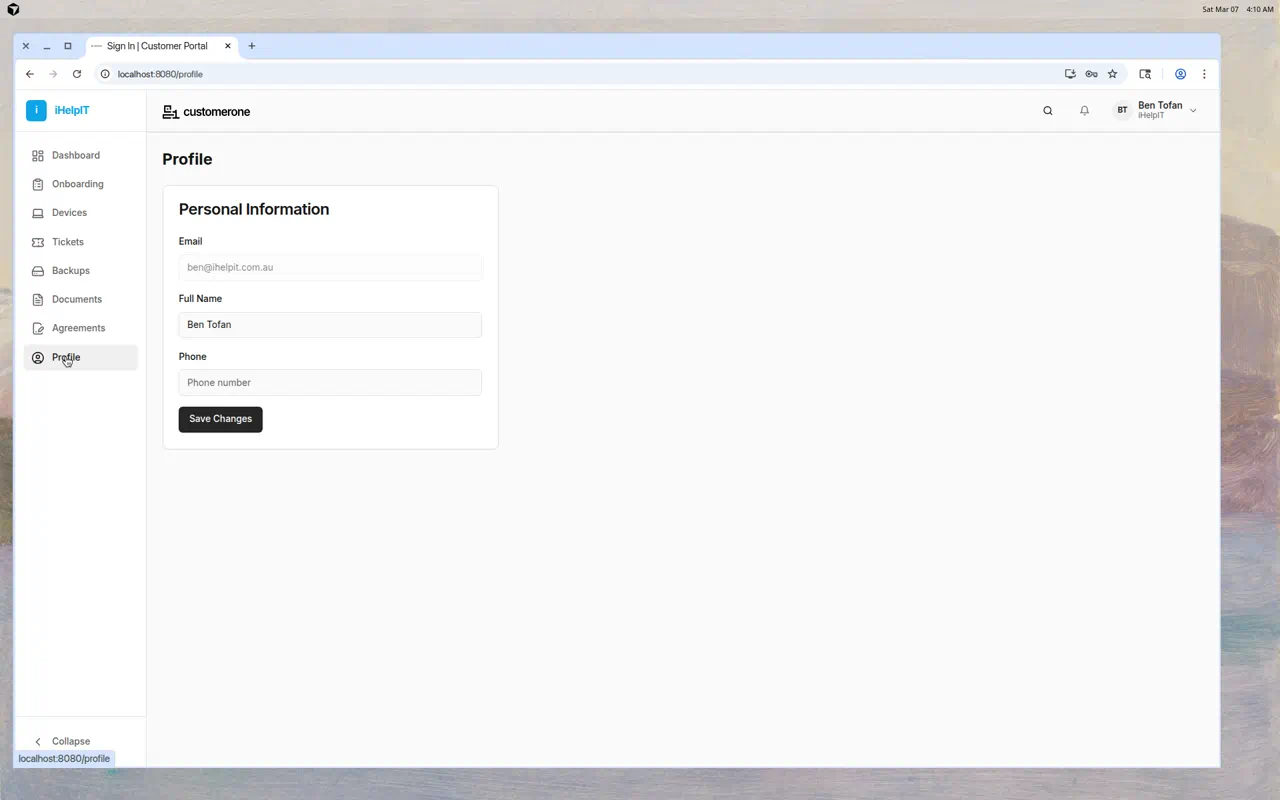
What You Can Update
Full Name
Update your display name as it appears throughout ClientOne.
- Click in the Full Name field
- Type your updated name
- Click Save Changes
Phone Number
Add or update your phone number so your IT provider can reach you.
- Click in the Phone field
- Enter your phone number
- Click Save Changes
Email
Your email address is shown but cannot be changed from this page. It's the email address tied to your account. If you need to change it, contact your IT provider.
Saving Changes
After updating any field:
- Click the Save Changes button
- A confirmation message appears when your changes are saved
- Your updated information takes effect immediately
Common Questions
Can I change my email address?
Not from ClientOne. Contact your IT provider to update your email address.
Can I change my password?
To change your password:
- Sign out of ClientOne
- On the login page, click "Forgot password?"
- Follow the password reset process
- Set your new password
Can I upload a profile picture?
Profile pictures are not currently available in ClientOne.
Tips
- Keep your phone number updated — Your IT provider may need to reach you about urgent issues
- Use your full name — It helps your IT provider identify you when you submit tickets