Microsoft 365
Navigation: Sidebar → Microsoft 365
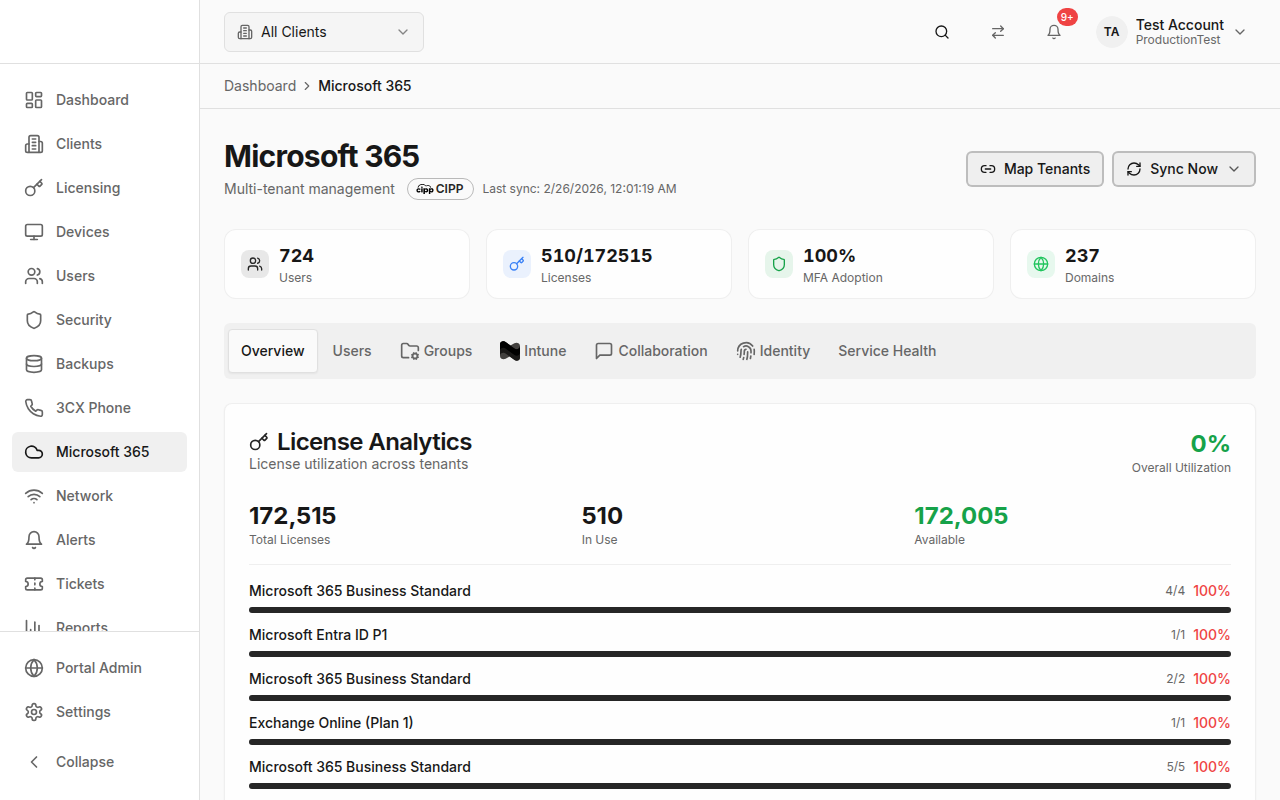
The Microsoft 365 page is a comprehensive multi-tenant management console for M365 environments. Monitor users, licenses, groups, Intune devices, collaboration tools, identity security, and service health — all from a single view.
Data Source Modes
PanelOne supports two ways to connect to Microsoft 365:
CIPP (CyberDrain Improved Partner Portal) — Recommended
- Best for multi-tenant MSPs with a partner relationship
- Connects via CIPP's API for comprehensive tenant management
- Supports user actions, group management, Intune, and more
Direct Microsoft Graph
- Direct API connection to Microsoft 365
- Works for single-tenant or multi-tenant setups
- Good if you don't use CIPP
A Data Source Badge in the header shows which mode is active and when the last sync occurred.
Single vs. Multi-Tenant
- Single Tenant — Managing one M365 tenant
- Partner Mode (Multi-Tenant) — Managing multiple customer tenants
In partner mode:
- A tenant count badge shows how many tenants you manage
- A Map Tenants button lets you link M365 tenants to PanelOne clients
- Per-tenant refresh is available
Stats Overview
Four summary cards at the top:
| Card | Shows |
|---|---|
| Users | Total M365 users across tenants |
| Licenses | Used / total license count |
| MFA Adoption | Percentage of users with MFA enabled |
| Domains | Total verified domains |
Tabs
Overview Tab
CSP Licenses Card — Channel partner license summary from your CSP provider.
License Analytics — Visual breakdown of license types, usage vs. available.
Security Score — Microsoft Secure Score with trend data.
Domains — Email domain health and verification status.
Security Alerts — Recent M365 security alerts with severity.
Users Tab
Full user management interface:
- User list with search and filtering
- MFA status per user
- License assignments
- User actions (if CIPP is connected)
Groups Tab
Microsoft 365 and Azure AD groups:
- Group list with type indicators
- Membership counts
- Group management capabilities
Intune Tab
Microsoft Intune device management:
- Enrolled device list
- Compliance status
- Device actions (sync, wipe, retire)
Collaboration Tab
Microsoft Teams and collaboration tools:
- Teams overview
- SharePoint sites
- Communication analytics
Identity Tab
Identity security and management:
- Inactive Accounts — Users who haven't signed in recently
- Audit Logs — Azure AD sign-in and activity logs
- AAD Connect Status — Azure AD Connect sync health
- Tenant Backups — Backup configuration status
- Recycle Bin — Recently deleted items
- JIT Admin — Just-in-time admin role management
Service Health Tab
Microsoft 365 service status:
- Grid of M365 services (Exchange, Teams, SharePoint, etc.)
- Status indicators: Operational (green), Degraded (yellow), Outage (red)
- Last incident description for affected services
- Search to filter services
Tenant Mapping
For multi-tenant setups, map M365 tenants to PanelOne clients:
- Click Map Tenants in the header
- The mapping dialog shows available tenants and PanelOne clients
- Match each tenant to its corresponding client
- Click Save
This ensures M365 data appears under the correct client.
Sync Options
CIPP Sync
Click the sync popover to choose what to sync:
- Users and groups
- Licenses
- Security data
- Intune devices
- And more category options
Microsoft Graph Sync
Similar category-based sync selection for direct Graph connections.
Per-Tenant Refresh
When a single client is selected, a Refresh Tenant button appears to sync just that tenant's data.
Tips & Best Practices
- Use CIPP for multi-tenant — It provides the most comprehensive feature set
- Map tenants immediately after connecting — Unmapped tenants won't appear in client views
- Monitor MFA adoption — Push for 100% across all tenants
- Check service health when clients report M365 issues — it might be a Microsoft outage
- Review inactive accounts regularly — They're a security risk and may have wasted licenses
- Use the Identity tab for security compliance audits
Related Guides
- Security Posture — M365 security score contributes to the overall security rating
- Users — User list synced from M365
- Clients — Map M365 tenant IDs to clients
- Settings → Integrations — Configure CIPP or Microsoft Graph